
How to Watch Virgin TV Go outside the UK: VPN Guide 2026
Virgin TV Go isn’t a streaming service you sign up for on its own. It’s the app Virgin Media includes at no extra cost with every TV package, Flex included, and it grew out of Virgin TV Anywhere, launched in November 2012. Watching Virgin TV Go outside the UK is what Virgin customers visiting the US want, but the app is built for Britain. At home in London or Leeds, signing in is enough. In New York or Chicago, you need one extra step.
That step is a VPN with a UK server. It changes your virtual location, so you can watch your Virgin TV channels anywhere in the world just like at home. We recommend Surfshark with British servers; the app itself streams live TV in HD. Depending on your package, you get up to 100 live channels, Sky Cinema movies, TNT Sports and Premier Sports, kids’ shows and news. Virgin TV 360 customers can also set recordings remotely, ready to watch when you get home. Setup takes a few minutes.
Can you watch Virgin TV Go outside the UK?
Best VPN for Virgin TV Go
Tested weekly by our team. Green: works, amber: partial, red: blocked.
| VPN Service | Price | Virgin TV Go | Tested | Action |
|---|---|---|---|---|

SurfsharkBEST | From $1.78/mo | ✓ Works | October 25 | Try it |

ExpressVPN | From $2.79/mo | ✓ Works | October 24 | Open |

NordVPN | From $2.99/mo | ✓ Works | October 25 | Open |
Private Internet Access | From $1.79/mo | ✓ Works | October 23 | Open |

ProtonVPN | From $3.59/mo | ~ Partial | October 23 | Open |

CyberGhost | From $1.75/mo | ~ Partial | October 26 | Open |

IPVanish | From $2.19/mo | ~ Partial | October 21 | Open |
How to Unblock Virgin TV Go with a VPN
Takes about 2 minutes. Works on your phone, tablet, TV, PC, or laptop.
- Pick a VPN with UK serversWe recommend Surfshark, which has fast servers across Britain and starts at $1.78 a month. Install it on the phone, tablet or laptop you’ll be watching on.The VPN is a separate subscription. Your Virgin Media contract stays exactly as it is.
- Connect to a UK serverOpen the VPN app and choose a server in the United Kingdom, ideally the one with the lowest ping. Turn the connection on before you launch Virgin TV Go.
- Open the app and sign inLaunch it on iPhone, iPad or Android, or open the web player in Chrome, Firefox, Edge or Safari. Sign in with the same Virgin Media account you use at home.
- Start a live channelPick a channel from your package, say TNT Sports, or a Sky Cinema movie. The app streams in HD, with no 4K. If playback stutters, hop to another UK server.
Which countries is Virgin TV Go available in?
Virgin TV Go is only available in the United Kingdom. To access it from anywhere else, use a premium VPN.
Available in 1 country No VPN needed
Blocked in 193 countries VPN required
Show all 181 more countries
Virgin TV Go is blocked in the United States, in Australia, in Canada, in New Zealand and in Ireland, plus in 188 more countries. To access it, use a premium VPN like Surfshark.
How Much Does Virgin TV Go Cost?
Entertainment
- Up to HD
- 2 simultaneous streams
- Offline downloads
Who’s behind the service?
What is Virgin TV Go
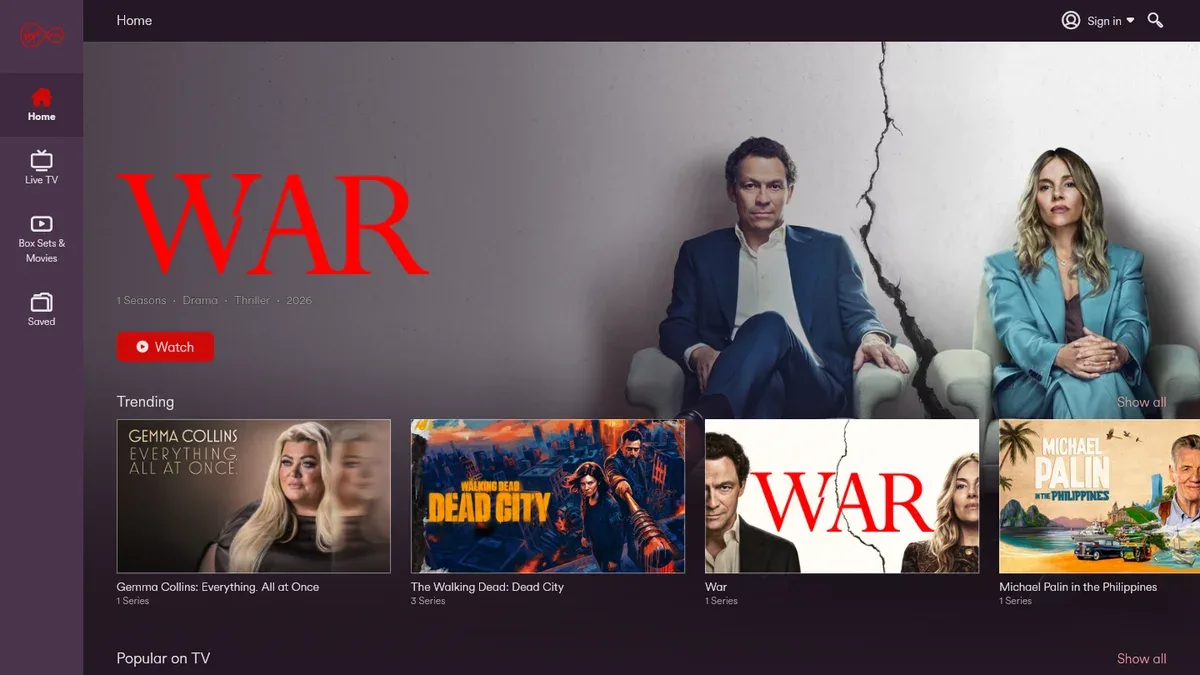
Virgin TV Go is Virgin Media’s companion app for Virgin TV subscribers, putting the channels you already pay for at home onto your phone, tablet, or browser. Depending on your package, that means up to 100 live channels, on-demand shows, Sky Cinema movies, and TNT Sports, while Virgin TV 360 customers can also set recordings remotely and play them back on compatible devices at home. It comes with every Virgin TV package at no extra charge and streams in HD on iPhone, iPad, Android, and the web. With a UK VPN server, your lineup travels with you.
Company and history
- Virgin Media launches the Virgin TV Anywhere app, the predecessor of today's Virgin TV Go, for customers of its Virgin TV service in the UK.
- Virgin TV Go arrives on the App Store and takes over from Virgin TV Anywhere, giving the service a new name and a new app for iPhone and iPad.
- Thanks to EU portability rules, Virgin customers can watch TV Go shows anywhere in the European Union, not just at home in the UK.
- Customers on the Full House and VIP packages can now download shows in the app and watch them offline, with no connection needed.
- Sky Cinema channels and movies are added to TV Go, so Virgin Media customers can now watch them in the app as well.
- Virgin Media combines with O2 to form Virgin Media O2, a joint venture owned in equal shares by Liberty Global and Telefónica.
- Virgin Media O2 launches Stream, a flexible TV service built around its own box, designed to work with older television sets too.
- Virgin Media publishes its TV Go guide: the app comes with every TV package including Flex, registers on five devices, streams on two at once and carries up to 100 live channels.
Trust signals
Watch on all your devices
Supported devices
Video quality
Tips & tricks you should know
5 tips from our Virgin TV Go testing team · Updated October 19, 2026
- On a Stream box, Virgin TV Go gives you My Watchlist instead of recordings: add shows and movies to keep everything you want to watch in one place.
- Device swaps on your Virgin Media account are limited each month, so set up your laptop and tablet before the trip.
- Virgin TV Go casts only to a Virgin TV box, so pack your laptop or tablet for the hotel room.
- No app needed on your laptop: the Virgin TV Go web player gives you a bigger screen than your phone.
- We recommend Surfshark: switch it to a UK server and catch live sport from your package on TNT Sports and Premier Sports in your hotel room as it happens.
Other services you can watch
Not the right fit? Here are services in the same category you can compare.
Frequently asked questions
Everything you need to know before subscribing to Virgin TV Go.
Ready to watch Virgin TV Go without borders?
Surfshark unlocks Virgin TV Go from anywhere in the world. Risk-free 30-day money-back.
Part of the Virgin Media O2 family.
Try Surfshark