Reviewed by Vladimir Uhlik · Affiliate DisclosureOur website contains affiliate links. We may receive a commission for purchases made through these links at no additional cost to you.
How to Watch My5 (Channel 5) Abroad: VPN Guide 2026
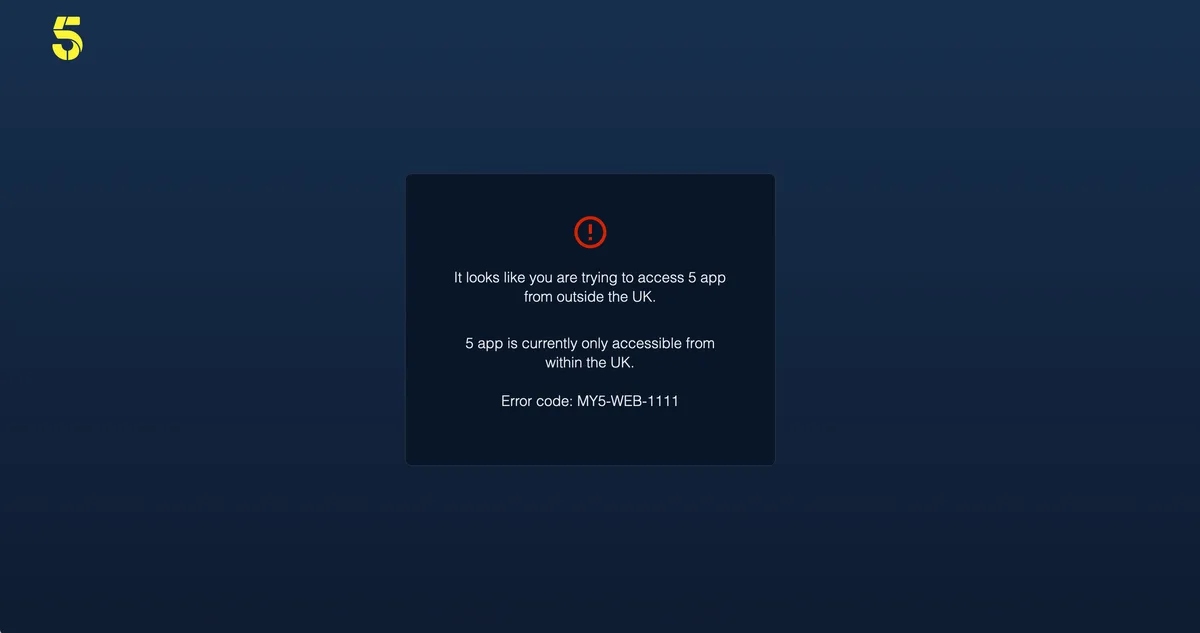
Owned by Paramount Skydance, the British broadcaster My5, now branded simply 5, has been delivering free-to-air television to UK living rooms for years. Viewers tune in daily for acclaimed dramas like Anne Boleyn and Dalgliesh, plus live sport headlined by NFL action, T20 cricket, and snooker. The whole digital hub runs without a subscription fee. Watching My5 abroad, however, brings everything to a halt: step outside the United Kingdom and you hit an immediate geo-block message. Licensing rules tie distribution strictly to UK connections, so the platform screens out foreign IP addresses automatically and tells you the content is not available in your region.
Getting past this barrier is straightforward with Surfshark. By routing your traffic through an encrypted server in Great Britain, your device picks up a temporary British IP, and the streaming service reads you as a local viewer. The full catalogue unlocks at once: every drama, documentary, and live channel opens on your laptop, phone, or smart TV. Setup takes only minutes, playback runs up to 720p, and because this is an ad-supported free service, you never pay a monthly fee. Just pick a provider with stable UK servers.
Free
Price
1
Country
720p
Max quality
7 of 7
VPNs work
2-3 min
Ready in
Quick answer
Can I watch My5 abroad?
Not without a workaround, as the platform restricts access to viewers inside the UK. When you travel away from home, the site checks your network origin and blocks the stream. To bypass this restriction, open Surfshark and connect to a UK server. This assigns your device a British IP address. Once connected, the service treats you like a viewer at home, letting you stream the entire library for free up to 720p.
VPN Compatibility
Best VPN for My5 (Channel 5)
Tested weekly by our team. Green: works, amber: partial, red: blocked.
Tested on October 5, 2026 · 7 VPNs, 7 working · residential IP from the United Kingdom · My5 (Channel 5) updates detection continuously, results may change.
⚠️
Streaming service blocking your VPN? Just disconnect and hop onto a different server in the same country. Stick to the ones labeled “streaming” or “optimized” because they’re literally built for this.
How-to
How to Unblock My5 (Channel 5) with a VPN
Takes about 2 minutes. Works on your phone, tablet, TV, PC, or laptop.
1
Get a capable VPN
Sign up for Surfshark and install the application on your preferred streaming device.
Look for their long-term plans to secure the lowest monthly rate.
2
Select a UK location
Launch the connection utility and click on a server based in London, Manchester, or another British city.
Using the closest available city server usually offers the best streaming speeds.
3
Access the My5 site
Head over to the official streaming portal or download the mobile app to set up your free profile.
The system requires a standard UK postcode during registration, such as W1A 1AA.
4
Enjoy your favorite shows
Browse the dynamic categories, select an exclusive drama like The Drowning, and enjoy the playback.
Keep the VPN running in the background for the entire duration of your streaming session.
Ready to watch My5 (Channel 5) without borders?
Surfshark: risk-free with a 30-day money-back guarantee
This overall 1-10 score combines value, reliability, and VPN compatibility into one editorial verdict. Higher = better overall experience.
10.0
Value
This 1-10 score rates the value for money: content and features vs. price. Higher = better deal. 10 = outstanding offer. 5 = market average.
7.0
Reliability
This 1-10 score rates the reliability of streams, apps, and the service overall: higher = fewer technical issues. 10 = no outages. 5 = occasional minor glitches.
7.0
Works with VPN
This 1-10 score shows how easily the platform unblocks with a VPN: higher is better. 10 = works with any service. 5 = you’ll need a premium VPN from the table above.
Availability
Which countries is My5 (Channel 5) available in?
My5 (Channel 5) is only available in the United Kingdom. To access it from anywhere else, use a premium VPN.
My5 (Channel 5) is blocked in the United States, in Australia, in Canada, in New Zealand and in Ireland, plus in 188 more countries. To access it, use a premium VPN like Surfshark.
Available
Blocked / unavailable
Last tested: July 14, 2026
⚠️
Steer clear of free VPNs. Most of them actually collect and sell your data, lack proper security audits, and can even expose you to malware. They’re also useless for streaming. Platforms block them instantly, leaving you with more headaches than solutions. Stick to paid VPNs with verified audits, like Surfshark, if you want something that actually works.
My5 is the free streaming portal of UK broadcaster Channel 5, operated since 2014 by Paramount Skydance (formerly Paramount Global, after Viacom bought the channel in 2014). Alongside the main channel, the app carries sister networks 5Star, 5USA, 5Action and 5Select, with a library that spans soaps like Neighbours, factual programming and licensed US drama. Everything is ad-supported and restricted to UK IP addresses.
My5 is geo-blocked abroad due to licensing restrictions.
Company and history
Previously known as
Demand 5
Major changes
Media giant Viacom acquired the British broadcaster Channel 5, instantly triggering massive infrastructure investments and setting the stage for a complete overhaul of the network's digital streaming architecture.
The network officially rebranded its Demand 5 catch-up service into My5, introducing a streamlined user interface alongside newly integrated content streams from sister brands like Pluto TV.
The completed corporate merger of Viacom and CBS formed the entity later known as Paramount Global, placing My5 under the umbrella of a massive content library with deep production resources.
The premiere of the period drama All Creatures Great and Small fueled unprecedented growth for the platform, drawing millions of viewers and solidifying the network's reputation for premium original programming.
A comprehensive app update rolled out across smart TVs and gaming consoles, locking in a steady 720p stream while enforcing strict registration protocols to keep international traffic at bay.
Paramount Global unveiled a long-term strategic plan to fully merge My5 with its free ad-supported streaming service Pluto TV, aiming to combine live broadcast television with extensive digital channels.
Alongside the rollout of its autumn programming block, the service deployed advanced video-player security upgrades, successfully neutralizing automated proxy networks attempting to scrape or access the live feeds.
Paramount Skydance leadership confirmed to industry trade press that the impending platform consolidation will unify ad-tech delivery pipelines and streamline user profiles across their advertising-based digital portfolio.
Content & Catalog
What to watch on My5 (Channel 5)?
Content TypesMovies · Series · Live TV · Live Sport · Documentaries · Kids · News · Originals
SubtitlesEnglish
Top titles right now
Home and AwayNeighboursCruising with Jane McDonaldThe Gadget ShowPolice Interceptors
Still can’t open My5 (Channel 5) where you are?
Connect Surfshark, pick a supported country, and you’re streaming My5 (Channel 5) in minutes, backed by a 30-day money-back guarantee.
Reads audits, not marketing copy. Goes through reports from PwC, Deloitte, and Cure53, verifies encryption, kill switch, and leak protection on every VPN we recommend. Tracks transparency reports, jurisdiction shifts, and policy updates. What he finds shapes which providers make the cut.
No-logs auditsEncryption protocolsPrivacy policiesVPN jurisdictionsTransparency reportsDNS and IPv6 leak detection
FAQ
Frequently asked questions
Everything you need to know before you start watching My5 (Channel 5).
You do not need your wallet for this service. The platform My5 runs entirely as a free, ad-supported service under its owner Paramount Skydance. There are no premium tiers or hidden charges, so you can enjoy your favourite programmes without worrying about monthly billing cycles.
The digital archive is optimized for efficient bandwidth consumption. The maximum video resolution is capped at 720p. While this lacks the crispness of 4K alternatives found on other platforms, it ensures fluid playback on mobile devices, tablets, and laptops even when using standard internet connections.
Offline downloading is not supported on My5 (Channel 5); there is no save-for-later feature, so every title streams live and needs an active internet connection. A steady connection of around 4 Mbps keeps shows like Dalgliesh playing smoothly without buffering.
No financial details are collected during registration. Setting up a user profile takes under two minutes and requires only a name, email address, and a valid United Kingdom postcode. Because the network features zero premium add-ons, your credit card information is never requested.
The broadcaster does not impose strict limitations on how many devices can stream under one registered account at the same time. However, if multiple family members want to watch hit series from abroad simultaneously, each individual device must be independently routed through a UK server using Surfshark.
The catalogue caters primarily to the domestic British market, so there is no alternative audio dubbing and everything plays in its original English. My5 (Channel 5) does offer English closed captions for the hard of hearing across most titles, which also make it a handy way to follow along.
The native application is widely distributed across major television brands, including Samsung, LG, and Sony models built for the UK market. If you are accessing the store from another region, you can mirror the stream seamlessly via a Google Chromecast or an Amazon Firestick connected to Surfshark.
Managing restriction levels is simple within the user dashboard. You can establish a four-digit Parental Control PIN that automatically restricts access to mature content. This ensures younger viewers cannot play grit-heavy exclusive dramas like The Teacher without adult authorization.
Account terminations for location routing are practically non-existent. While automated firewalls regularly filter out blacklisted server IP addresses to protect broadcasting licenses, your user profile remains safe. If you hit a connection error, switching to a different British city node within Surfshark restores access.
This technical hitch typically stems from browser cookie leakage revealing your actual physical location. To resolve this conflict, clear your browsing history or launch a clean incognito tab. Turn on your UK digital tunnel via Surfshark before navigating back to the video library.
Yes. Channel 5 carries free-to-air live sport in 2026, headlined by live NFL games including the Super Bowl, plus T20 cricket and snooker, all streamed on 5 too. Because live feeds carry far stricter geo-fencing than archive shows, you need an active UK server from Surfshark for them to play.
Account deletion is handled in compliance with UK privacy regulations. You can submit a formal removal request directly through the privacy settings tab in your user profile. This action instantly wipes your viewing history, saved favorites, and registration credentials from the central database.
Ready to watch My5 (Channel 5) without borders?
Surfshark unlocks My5 (Channel 5) from anywhere in the world. Risk-free 30-day money-back.